

What problems come from messy CRM data?
A messy CRM costs a machine shop money through duplicate records, unreliable reports, lost RFQs and orders, wasted marketing spend, lost admin hours, low team adoption, and access risks. Each one either costs you revenue you never see or labor you pay for twice.
A shop we worked with had a problem that never showed up on a report: nobody on the sales or service team had connected their email to HubSpot.
So the team built a workaround. Anything a customer sent that needed multiple eyes went through a Microsoft distribution list. Everyone who needed to see it got it in their inbox. It looked like it was working.
It wasn’t. A distribution list doesn’t share one email. It delivers a separate copy to every recipient. Ten people on the list means ten copies, and each person replies from their own. Some of those replies went back to the whole list, which spawned another round of copies. Within a few days, one customer email had turned into a pile of parallel threads, and no one could say which was current.
Two reps followed up on the same request, and other reps answered an older message because they never saw the newest one. Customers got inconsistent answers, and nothing was logged to the CRM, so there was no single record of what had actually been said.
It’s the same thing that happens when you photocopy a job traveler for ten people and let each of them write on their own copy. There’s no master, so no one knows what the latest revision says.
That’s what a messy CRM looks like in practice. It’s rarely one big failure. It’s a workaround that quietly multiplies work. In this shop’s case, it also nearly cost them a quote and a customer’s order, and we’ll get to that in section 3. Here are seven ways it costs you.
1. Duplicate records inflate your costs
A duplicate contact looks harmless. Two entries for the same buyer, so what? But in HubSpot, you pay based on how many marketing contacts you carry, and a duplicate can count as another contact you’re paying for. They also split your history, so no one sees the full picture of who that buyer is and what they’ve asked you for.
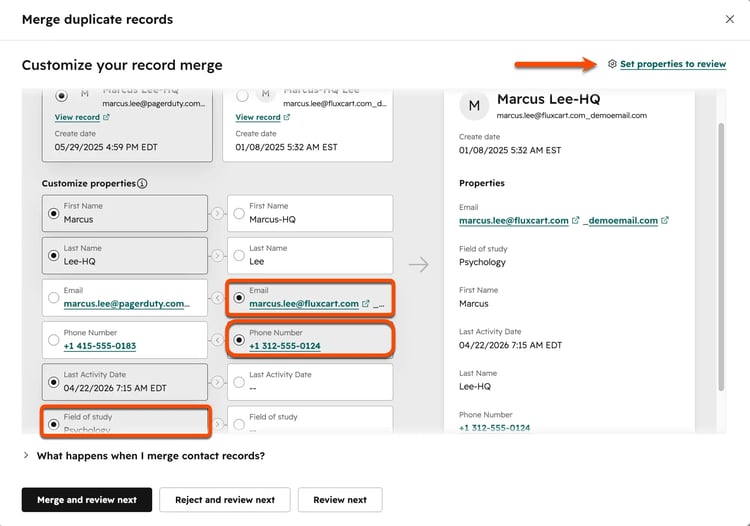
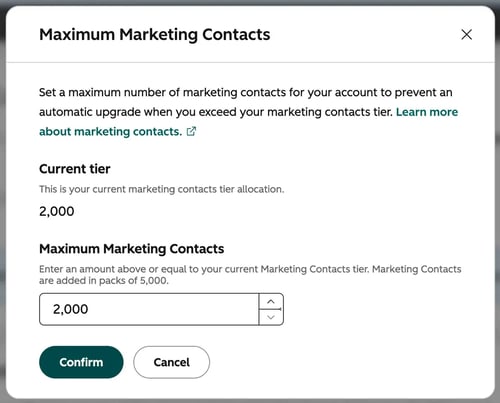
One client had accumulated enough duplicates that they were eating into their marketing contacts limit. Go over the limit and you pay for additional contacts, so the shop was on track to spend money to store the same people twice.
We worked through their Contact records using HubSpot’s duplicate management tool and cleaned up the data quickly. The shop avoided paying for contacts it didn’t actually have.
It’s like counting the same part twice in your inventory and buying extra shelving to hold it. The shelving is real money, but the part was never there.
2. Reports you can't trust
A micrometer that’s out of calibration still gives you a number. It looks precise, and you’ll make decisions off it anyway. A CRM works the same way.

When records are duplicated, fields are blank, and deal stages haven’t been updated, the dashboards still render. Pipeline totals, win rates, and forecast numbers all come out looking exact. But they’re built on whatever is in the system, and if what’s in the system is wrong, the report is wrong with full confidence.
The cost shows up in the decisions made from those numbers: where to put marketing spend, how many quotes your team can realistically handle, which customers to prioritize, and when to hire. And once an owner catches one number that doesn’t match what they know to be true, they stop trusting every number, and the dashboards go unused.
3. RFQs and Purchase Orders get lost
A distribution list has no owner and no record. When a message goes to ten inboxes, each person can assume someone else is handling it. If something goes wrong, nothing in the system shows where it went.
That’s how one of our clients lost a large RFQ from an aerospace OEM prior to setting up their Outlook integration with HubSpot. The request went to the distribution list, and between the forwarding and the extra copies of the original email, it was lost. Nobody on the team knew. The shop found out weeks later, when the prospect followed up to ask for a status update on a quote the shop never knew it had.
It happened again with a purchase order from an established customer, this one for several hundred components. It got lost the same way, and sat for several weeks until the customer reached out to ask whether their order was on time. It wasn’t.
Neither of those showed up as a failure in the CRM, because the CRM never saw the emails. The first signal either time was the customer asking where their order or quote was.
The shop was able to salvage the RFQ and fulfill the PO, though late. It was a close call, and it’s what convinced them to connect every sales and service rep’s email account to HubSpot.
4. Marketing spend gets wasted
Every address that bounces is money spent on an email that never arrived. It also hurts your sender reputation, which makes future emails more likely to land in spam, including the ones that matter.
One shop we worked with sent its customer emails through a standalone email tool, separate from its CRM. That meant paying for a second system, and the tool had no way to flag undeliverable addresses before a send. The shop found out how many contacts had bounced only after the email went out and the cost was already incurred.
Once that email activity moved into HubSpot, we used its email bounce reason property to find and clean up bad contacts before the send. The list that went out was one the team could trust, and the cost of finding out was no longer tied to the send itself.
It’s the difference between inspecting parts in-process and finding the scrap after the shipment reaches the customer.
5. Your team loses hours to workarounds
The distribution list is a good example here, too. Forwarding emails, reconciling threads, and asking “which one is current?” is time nobody budgeted for, and none of it produces anything. It’s labor cost hiding inside daily habits.
A messy CRM creates the same drag in smaller ways: hunting for a contact’s real record, re-keying information that should already be there, and cleaning up data before a pipeline review. Add it up across a team, every week, and it’s a real line on your payroll.
6. The team stops using it
When a CRM doesn’t match how people work, they go around it. In the shop above, nobody connected their email to HubSpot, so the team worked in Outlook and left the CRM out of it. They were paying for a system that wasn’t running any part of the actual work.
This is how adoption fails. Nobody announces it. People just fall back to inboxes, spreadsheets, and memory. Once that happens, the data gets worse, which makes the system less useful, which pushes people further away from it.
7. User permissions drift
People change roles, leave, and join. If no one reviews access, it drifts. A former employee may still have access to customer and pricing data. A rep who moved to a different role may see records they no longer need. And the people who do need to see something sometimes can’t.
The cost is split between risk and friction. The risk is customer and pricing data in the wrong hands. The friction is someone who needs a record and has to ask for access, or someone who can’t see the full picture because their permissions were never updated.
How to tell if your CRM data is messy?
- Your team forwards customer emails, or uses distribution lists, to keep everyone in the loop
- Two people can give you different answers about the same customer’s history
- Your pipeline report doesn’t match what you know is true
- You’ve gone over your marketing contacts limit and aren’t sure why
- You find out about bounced emails after the send
- Someone who left the company can still log in
- Your team keeps a “real” spreadsheet next to the CRM
How to fix your messy CRM data?
For the shop with the distribution lists, the near-miss on that RFQ and PO settled the question. We connected their sales and service reps’ email accounts to HubSpot, so every email logs once to the contact record, with one thread and one history that everybody can see.
Then we went a step further. We onboarded Service Hub Enterprise and built out a full ticket pipeline and help desk, so customer requests have an owner and are tracked until they’re closed. Because every shop handles inquiries differently, we also built custom properties, workflows, and views around how this one processes them. With that in place, they retired the distribution list for good.
Quick fixes you can start this week
You don’t need a project to stop the worst of it. These won’t rebuild your portal, but they work like a daily gauge check: they catch drift before it turns into scrap.
☐ Stop sharing customer emails through distribution lists. Connect each rep’s inbox to HubSpot so every email logs once to the contact record. (Lost RFQs, lost hours, adoption)
☐ Run HubSpot’s duplicate management tool and merge the obvious matches. (Duplicates, reports)
☐ Compare your marketing contacts count to your limit. Set contacts you don’t actually market to as non-marketing so they stop counting against it. (Duplicates, marketing spend)
☐ Filter for hard bounces and invalid addresses and remove or suppress them before your next send. (Marketing spend)
☐ Assign an owner to every open deal, ticket, and contact that doesn’t have one. (Lost RFQs)
☐ Review your user list. Deactivate anyone who’s left and check that each remaining user’s role and permissions still fit their job. (Permissions)
☐ Check your dashboards against what you know is true. If the top three numbers don’t match reality, find out why before you rely on them, and delete any reports nobody uses. (Reports)
☐ Name one person who owns CRM hygiene, and put a recurring block on their calendar for it. (All of the above)
A quick fix clears what’s already there. It won’t stop the problems from rebuilding, which is why the pattern for anything bigger is the same: audit what’s there, clean it, and keep it clean.
Our HubSpot Maintenance service covers the recurring cadence. If the portal was never set up correctly to begin with, HubSpot Onboarding fixes the foundation, including choosing which hubs and tiers fit your shop. And when your process doesn’t fit standard HubSpot, HubSpot Customization builds the pieces that do.