

Recruitment is a necessary, but expensive, activity. And manufacturers have tremendous budget constraints, especially small and medium-sized ones.
This is my budget-friendly strategy for posting open jobs and managing applicants. I used it for nearly 5 years at a medium-sized machine shop. It yielded great results on the hiring side of things, and looked great as a line item on a budget sheet (fixed cost of $700/month).
My strategy for budget-friendly job postings is two-fold: being picky where I put my job posts and utilizing existing software investments to manage applicants.
Where to Post Manufacturing Jobs
Where you post your jobs will dictate a large part of your budget and the types of candidates you source, both quantity and quality.
During my time managing recruitment, I found that standard job platforms like Indeed or LinkedIn don’t perform as well as others for sourcing manufacturing candidates; that’s why I don’t dedicate any of my recruitment budget to those platforms.
My go-to channels for posting manufacturing jobs were the company website, Indeed, LinkedIn, and FactoryFix. For the actual posts themselves, I used the same job description across the platforms and chose “URL” as the application method (linking to the job post on the company website) on LinkedIn and Indeed so that I only had to manage applicants in one place.
Company Website
The first place I post a job opening is on the company website. If you’re a manufacturer who’s already paying for a branded website, this is a great place to put your job openings, especially if you concurrently pay for a CRM and the two platforms are connected (e.g., my shop used HubSpot CRM and hosted their website through HubSpot’s Content Hub).
Applicants did find those jobs directly from the website, but I also used the link to build my job post on other platforms, like Indeed.
You can’t not post a job opening on LinkedIn (pardon the double negative), especially when they give you one free post at a time. That being said, I kept my expectations basically on the floor when it came to LinkedIn candidates. It truly depended on the position.
For example, if we were hiring for a Manufacturing Engineer, I might get some quality candidates. If we were hiring a CNC Lathe Machinist, I did not expect any candidates. But hey, it’s free. You should always go for the free job post. I would not pay for additional job postings unless it was a role well-suited to the platform and I had additional budget.
Indeed
Much like LinkedIn, I don’t put much stock in Indeed’s ability to fill manufacturing job openings. But also like LinkedIn, Indeed gives you free job posts, and we always use popular platforms when they’re free.
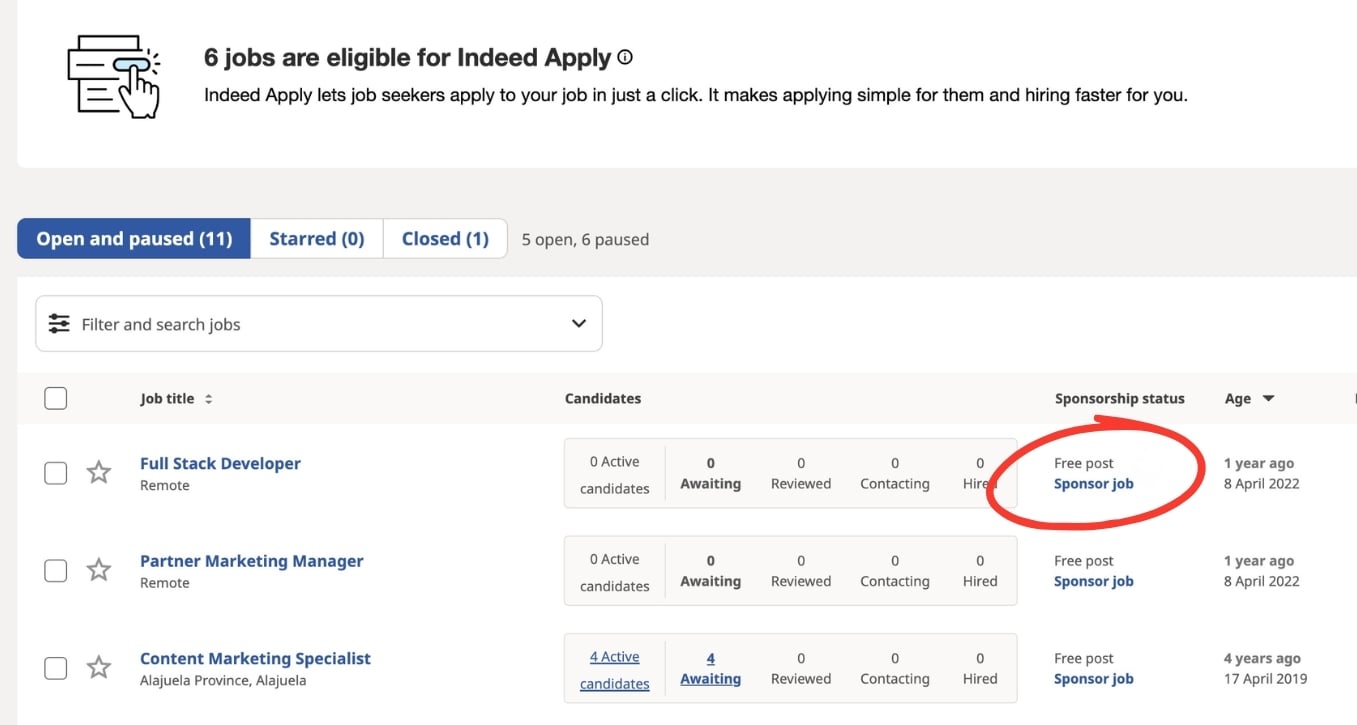
When setting up your job post, Indeed will ask if you want to sponsor your job. I always bypass this option and stick with the free job post.
FactoryFix
I will preface this whole section by stating that I am not sponsored by FactoryFix (but it’s never too late if you guys are reading this). But FactoryFix was the entirety of my recruitment budget.
A FactoryFix subscription gets you access to quality candidates, Copilot-driven candidate qualification, labor market reports, passive candidate sourcing, and active candidate engagement.
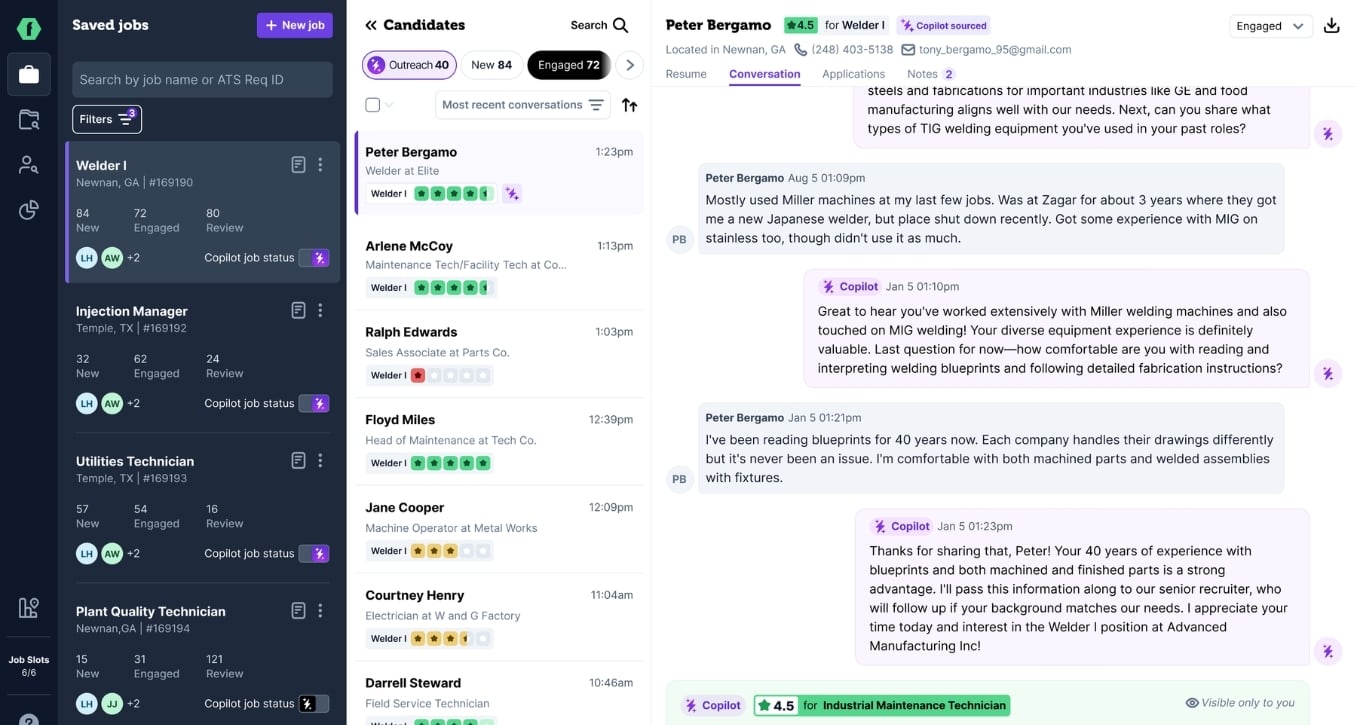
I could do a whole separate blog post about why I used FactoryFix (double-check the Recruitment section, I may have put one up by now), but I’ll spare you the details in this post so we can stay on task. Check out their website for more info about their recruitment approach and platform that’s customized for manufacturers.
A quick note
At the time of writing this, there was no direct/native integration between FactoryFix and HubSpot. When a candidate was qualified enough to be reviewed by the hiring manager, I would manually add them to our ATS in HubSpot.
Managing Applicants with your CRM (save money on ATS)
We’ve covered where to put your job posts, now let’s talk about how to manage the applicants that they source.
Platforms like Workday, ADP, and Bamboo HR all cost extra money. If you’re already paying for a CRM, though, you can turn that into a full-fledged applicant tracking system (ATS) with just a few customizations.
During my career, I’ve used almost exclusively HubSpot as my CRM of choice. I won’t go into detail here about why it’s my preferred CRM, but we’ll roll with it.
Rather than pay for a separate ATS, I built one on top of our existing CRM using standard HubSpot tools and a few custom properties, including:
A blog to work as a job board (each blog post was a separate job opening complete with job description and application; you can even use the tag feature to give candidates filtering options like engineering, quality, production, and so on).
Forms to serve as applications (think name, email address, phone number, standard application questions, and file drops for resumes and cover letters).
Contacts became applicants with a custom property that I named “User Type” (contact types included prospect, customer, applicant, employee, and supplier). Custom contact properties let me build out candidate profiles (experience, machines used, applicant quality, types of manufacturing experience, etc.).
Deals served as standalone applications (created whenever a candidate filled out the Application form on the job board/blog post) that could be associated with an Applicant/Contact, and I programmed it to let multiple applications be associated with a given Applicant. I also built custom properties for Deals to really round out an application (i.e., disqualification reason, start date, name of internal referral, etc.).
Deal Pipelines worked as hiring, onboarding, and offboarding funnels to capture the full Applicant/Employee lifecycle.
|
Hiring Stages |
Applied Screening Qualifying Interviewing Final Review Offer Sent Offer Accepted (Closed Won) Application Closed (Closed Lost) |
|
Onboarding |
At Time of Hiring 1 Week before Start Date First Day 1 Week after Start Date 30 Days after Start Date |
|
Offboarding |
2 Weeks before Termination Date Week of Termination Date Termination Date 2 Weeks after Termination Date |
Managing your applicants and applications in a CRM, let alone HubSpot, is purely a suggestion. It was a great solution for the machine shop I worked for, and it had massive cost saving advantages. We were also able to use HubSpot’s workflow tool to automate a lot of the recruitment activities that spanned our hiring, onboarding, and offboarding processes. This meant fewer manual activities and having to “remember to remember” what needed to be done or what had already been completed in any given process.
The fact that we “did recruitment” on a shoe string budget did not hinder the quality of our applicants or the speed at which we hired, and it allowed the shop to dedicate dollars to other critical needs.
You can also pick and choose from these ideas. I’ve used them to execute a comprehensive recruitment strategy for manufacturers, but each org’s needs differ from the next. Take what you need and leave the rest. I hope these suggestions and best practices are helpful!

 Amanda